
7.9 KiB

NeoRefacer: Images. GIFs. Full-length videos.
In a future where identity flows like data and reality is just another layer, NeoRefacer gives you the power to transform.
Images. GIFs. Full-length videos.
All yours to reface and reimagine - with a single pulse of electricity.
Evolved from the foundations of the Refacer project, NeoRefacer is a next-generation, fully open-source refacer.
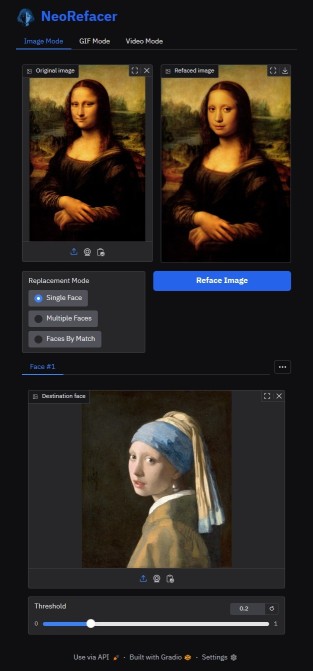
- Clone the repository.
- Spin up the environment.
- Launch the local interface.
- Control the face of tomorrow.
Core DNA of NeoRefacer
- Instant Identity Shift - Swap faces in images, GIFs, and movies faster than your neural implants can blink.
- Overclocked Engine - Optimized for CPU rebels and GPU warlords.
- Feature Film Reface - Not just TikToks. Full two-hour cinematic overthrows.
- Targeted Strike Modes - Single-face raids, multi-face takeovers, or precision-targeted matchups.
- Bulk Warfare - Mass-process entire image archives with industrial-scale automation.
- Neural Enhancement Suite - Automatic image enhancement.
Use Cases
- Entertainment: Rewrite memories, remix movies, animate the past.
- Education: Step into history, speak through new faces.
- Content Creation: Craft AI doubles, weave digital alter-egos.
- Business/Marketing: Personalize ads inside the algorithmic flood.
- Niche Fun: Trace ancestral echoes, forge RPG legends, hijack fame.
What's New (Since Refacer)
- Image, GIF and Video reface modes
- Significantly faster processing
- Automatic image enhancing (Image mode)
- Improved video output quality
- Support for videos that have long duration
- Preview generation for videos and GIFs (skips 90% of frames)
- Multiple replacement modes:
- Single Face (Fast): all faces are replaced with a single face. Ideal for images, GIFs or videos with a single face
- Multiple Faces (Fast): faces are replaced with the faces you provide based on their order from left to right
- Faces by Match (Slower): faces are first detected and replaced with the faces you provide.
- Improved GPU detection
- Uses local Gradio cache with auto-cleanup on startup
- Includes a bulk image refacer utility (refacer_bulk.py)
NeoRefacer, just like the original Refacer project, requires no training - just one photo and you're ready to go.
⚠️ Please, before using the code from this repository, make sure to read the LICENSE.
System Compatibility
NeoRefacer has been tested on the following operating systems:
| Operating System | CPU Support | GPU Support |
|---|---|---|
| MacOSX | ✅ | ⚠️ |
| Windows | ✅ | ✅ |
| Linux | ✅ | ✅ |
The application is compatible with both CPU and GPU (Nvidia CUDA) environments, and MacOSX(CoreML)
⚠️ Please note, we do not recommend using onnxruntime-silicon on MacOSX due to an apparent issue with memory management. If you manage to compile onnxruntime for Silicon, the program is prepared to use CoreML.
Installation
NeoRefacer has been tested and is known to work with Python 3.11.11, but it is likely to work with other Python versions as well. It is recommended to use a virtual environment, such as Conda, for setting up and running the project to avoid potential conflicts with other Python packages you may have installed.
On Windows, before continuing, ensure that you have the Visual Studio Build Tools installed. They are required for installing dependencies. If you skip this step, you will likely encounter an error prompting you to install them.
Follow these steps to install Refacer and its dependencies:
```bash
# Check if ffmpeg is available (if not, you might to download it and add it to your PATH)
# Windows: download ffmpeg-git-essentials.7z from https://www.gyan.dev/ffmpeg/builds/
# Other systems: see a tutorial https://www.hostinger.com/tutorials/how-to-install-ffmpeg
ffmpeg

# Clone the repository
git clone https://github.com/MechasAI/NeoRefacer.git
cd NeoRefacer

# Create the environment
# Windows:
conda create -n neorefacer-env python=3.11 nomkl conda-forge::vs2015_runtime
# Linux:
conda create -n neorefacer-env python=3.11 nomkl
# MacOS:
conda create -n neorefacer-env python=3.11

# Activate the environment
conda activate neorefacer-env

# Instal the dependencies:
# For CPU only (compatible with Windows, MacOSX, and Linux)
pip install -r requirements-CPU.txt

# For NVIDIA RTX GPU only (compatible with Windows and Linux only, requires a NVIDIA GPU with CUDA and its libraries)
pip install -r requirements-GPU.txt

# For CoreML only (compatible with MacOSX, requires Silicon architecture):
pip install -r requirements-COREML.txt
```
For NVIDIA GPU, make sure you have both NVIDIA GPU Computing Toolkit and NVIDIA CUDNN installed. The onnxruntime-gpu version must match your version of CUDA. This example uses onnxruntime-gpu 1.21.0, which is compatible with CUDA 12.6 and CUDNN 9.4 - Refacer.py is pre-loading both libraries. Remember to update the paths if needed in refacer.py if you have different location or versions.
For more information on installing the CUDA necessary to use onnxruntime-gpu, please refer directly to the official ONNX Runtime repository.
Usage
Once you have successfully installed NeoRefacer and its dependencies, you can run the application using the following command:
python app.py

# Alternatively, if you need to force CPU mode
python app.py --force_cpu
Then, open your web browser and navigate to the following address:
http://127.0.0.1:7680
A bulk refacer utility is also available and can be called using the following command:
python refacer_bulk.py --input_path ./input --dest_face myface.jpg
Questions?
If you have any questions or issues, feel free to open an issue.
Third-Party Modules
The recognition folder in this repository is derived from Insightface's GitHub repository. You can find the original source code here: Insightface Recognition Source Code
This module is used for recognizing and handling face data within the NeoRefacer application. We are grateful to Insightface for their work and for making their code available.
The image enhancing capability is based on codeformer (by Shangchen Zhou) and BasicSR. It also borrow some codes from Unleashing Transformers, YOLOv5-face, and FaceXLib. Thanks for their awesome works.
License
Note: This project uses a Custom MIT License, not allowing commercial use of the code unless you remove the image enhancing component. The output (refaced image or video) is not restricted by CC BY-NC-SA and may be used including for commercial purposes. See LICENSE for full terms.
The generated content (refaced images or videos) does not represent the views, beliefs, or attitudes of the authors of this Software. Please use the Software and its outputs responsibly, ethically, and with respect toward others.
Credits
Special thanks to Roberto Marc for the additional testing.